




My Fire tablet was turned off but on charge - suddenly it just came to life and started blurting out adverts, how can this happen ?

I.T. Non-Techie help, information and tips
No advertising please. For the non-techie among us who may need a helping hand at times.
Open Loop 113
-

-

Edge browser - new feature (Edited)
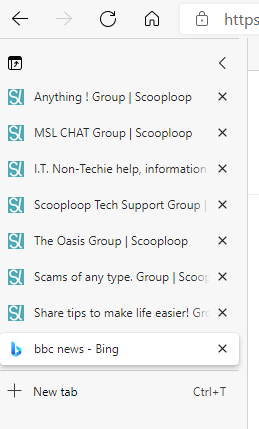
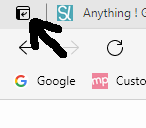
Microsoft's Edge browser has added the ability to view all open tabs in a sidebar. This makes it easier to see the open tabs, particularly if you have many tabs open, which shortens the title text on the tabs. The icon to activate the feature, is in the top left-hand corner. The feature that I find very useful in Edge, is the ability to remove website clutter, and leave the text, which you can even have read to you: https://www.scooploop.com/thread/remove-website-clutter-and-save-paper-and-ink
This discussion is now closed.
-
-

I Skype with my sister-in-law. Lately I can not hear her but she can hear me. I am o.k. with other relatives.
Any suggestions? Please in simple terms and many thanks. -
Windows - Be prepared - Faulty keyboard (Edited)
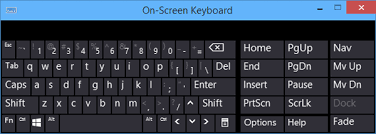
Should your keyboard become faulty, or stop working, Windows has an on-screen keyboard built in. You can activate this by right-clicking the taskbar, and ticking Show touch keyboard button; the keyboard button will appear next to the clock. You can then use the mouse to type. Activate it before you need it, and explore the various functions it has.
.
More information here: https://bit.ly/3gvvo8v -
-

Does anyone know if you can connect an android tablet to a printer either hard wired or wirelessly? I need a new printer and don't have a laptop any more.
-

For owners of non-functioning printers
If yours is less ancient than mine and capable of helping the user to understand where it's going wrong, then this should be useful: https://therestartproject.org/data-and-insights/help-us-learn-more-about-printers-with-printcat/
-
Windows 10 - version 1909 warning
Microsoft is now warning users of version 1909, to update their computer. Version 1909 will no longer receive security updates after 11th May. You may see the following warning displayed on the taskbar: 'Your version of Windows 10 will reach end of service soon. Click to download a newer version of Windows 10 to stay supported.'
To see which version of Win 10 you have, type winver in to search box, and press enter.
Not all computers can be updated to a new version. -
Scooploop is requesting members to leave a review at Sitejabber.com. (Edited)
Come on happy users, the complainers are winning.
..
If you value Scooploop, I urge you to take the time to leave a review. During the past few days, a series of very bad scathing reviews have been left. Imagine logging on to Scooploop one day to be greeted by a page saying: 'Time to turn out the lights', which is what happened to Kahuti. Bear in mind, that if that happens, you will lose contact with everyone, your content, and information that has been posted.You will have to register to leave a review: https://www.sitejabber.com/reviews/scooploop.comThis discussion is now closed.
-
Facebook hack published online
In 2019 Facebook was hacked, and 533 million phone numbers were acquired. Shortly after, Facebook found and fixed the breach. 11.5 million of these were in the UK. This information has now been made available for free on the Internet. If you have given your mobile phone number to Facebook, you can check to see if yours was included, by visiting https://haveibeenpwned.com/ and entering your phone number as follows: start with 44, then omit the zero at the beginning, then the rest of the number. Whilst you are there, you can also check to see if your email address has been acquired in a breach of any website you have given it to. This information can now be used to launch mass attacks.
-
This has suddenly changed with icons that used to be at the bottom now on a sidebar, it's off putting and I don't like it.
Is there any way to move it back to the bottom ? -
Chrome browser: Add captions to video and audio content
The Chrome browser now has the ability to generate real-time captions, allowing you to view captions on pretty much any video or audio content, whether it's on the web or stored on a local hard drive.
This feature can be activated as follows:
1. Click the three menu dots top right.
2. Click Settings.
3. Click Advanced menu on left, then Accessibility.
4. Click to move the Live Caption slider on the right to turn it blue.
5. A speech recognition file will now be downloaded.
The text will appear in a movable box.
Currently only English is available. -
This might sound stupid but ..... could a machine being used next door interfere with my WiFi/internet ?
-

I use Microsoft Edge Chromium as my default browser, but have DuckDuckGo as my default search engine.
My browser opens with DuckDuckgo, but all tabs open with Bing.
If I use Bing to search, a small panel comes up offering me the option of using DDG for the search item, which I then click.
I like this arrangement. Bing provides a constant series of the most beautiful and breath-taking natural scenes possible.
They have a "Like this image" button, giving a choice of "I like it" or "Not a fan". If you click "I like it" Bing will tell you where the image is taken and will then keep providing similar images.
If you click "Not a fan", Bing will keep providing a series of alternative images until you do like one and select it.
The purpose of this post is to emphasise what spectacular natural images Bing provides.
-
What to do about an apparently failing laptop keyboard?
I never replace my laptop until it's no longer usable but the keyboard of this nine-year-old HP Pavilion has begun becoming noticeably less responsive - I often have to click on it twice before it responds - and I worry about whether it's about to fail. (I take care to keep it clean, so it's not simply become dirty.) It's my only internet-capable device.
What's the best way to ensure that I don't lose the use of a computer? Now that I've got used to using the touchpad, I don't really want to revert to having a mouse cluttering up my limited desk space and monopolising a socket on the laptop.
Someone once mentioned an external keyboard, which would be even bulkier - unless I built a shelf to hold the laptop. But would that be the best solution? Can a separate keyboard be connected entirely wirelessly, or does it also need to be physically connected to a socket on the laptop? -
Search Engine (Edited)
Google is incredibly intrusive, a fact which is widely known globally. All your web activity, habits and private information is collected, analysed and used on a huge scale.
I have used DuckDuckGo for years on all my browsers - https://duckduckgo.com
It is an excellent search engine and is completely private, neutral and reliable.
Make DuckDuckGo your Home Page today.
It is used and recommended by many computer geeks. -
Updates on laptop (Edited)
Is it right to have 3 updates in one day ? - I have never had this happen before.
-
Do you use LastPass password manager?
If you use, or are considering using, the free LastPass password manager, then note that as from 16th March, you will no longer be able to sync between PCs and mobile devices (tablets and phones). The device that you use to log in from that date decides your choice of PCs or mobile devices. To continue to sync all your devices, you will have to pay £31.20 per year. You will get three chances to change your device choice before it is locked.
-
Routine Windows 10 system File Checker (Edited)
This is a superb way to keep your files maintained. I run it frequently, it takes about 20 minutes and repairs any files found which are corrupted.
Click the search button - second from the left on the taskbar. type CMD then click Open or Admin. Click YES on the popup panel. A black command prompt screen shows.
Where the cursor mark is blinking - type sfc /scannow - press enter.
The file checker will then start.
On finishing, it will say that either all is OK or that some files have been repaired.
NOTE - See first comment by John H for more information, and more tools. -
Box instead of emoji on text message
My very basic mobile 'phone clearly doesn't like emojis, so it shows a small blank box (like a tick box) instead of those in a text.
I don't suppose that it's possible to tell which emoji this represents? -
All Settings - Windows 10 (Edited)
Quick access -
Far right on taskbar, click Notifications icon (dimpled rectangle) - click All Settings in selection options - All settings is displayed. -

Samsung phone (Edited)
I'm not sure if I want to upgrade my Samsung phone. I currently have an A40.
Lots of very good offers on the new Samsung Galaxy S21 5G Series. Problem - this doesn't take an SD card.
Any advice please -

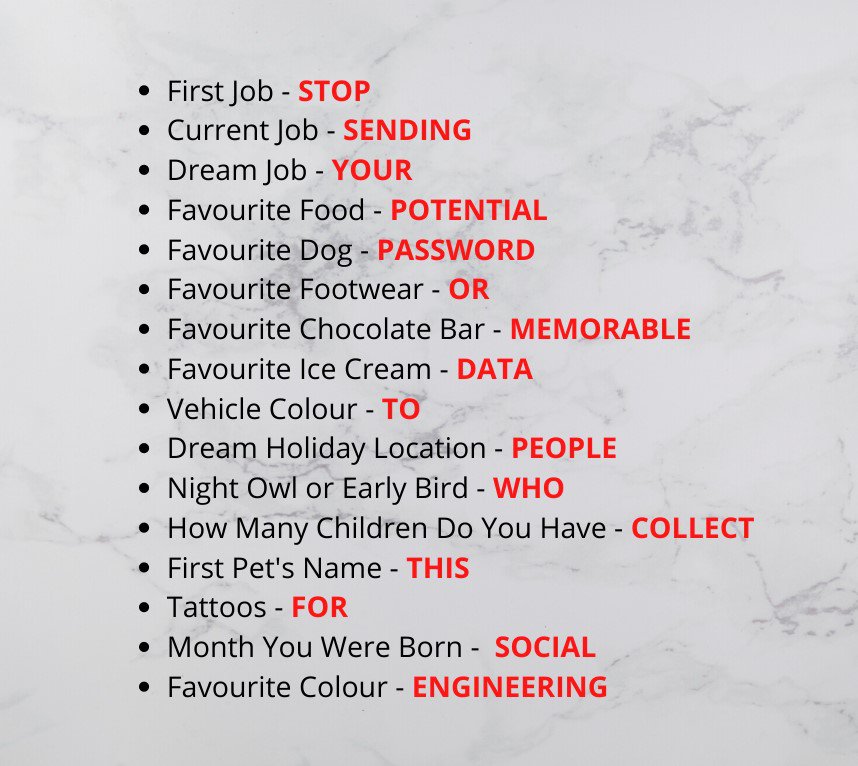
If you use social media please be aware of quizzes and surveys
Be careful about the information you give away on social media, especially when completing surveys and quizzes.
The information you give away can help scammers to build a bigger picture of you.
#socialmedia #Scammers #ScammerAlert
This was copied from my local police Facebook page -
-
Turning off a Windows PC - Part 2 (Edited)
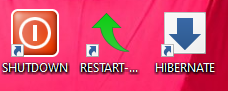
The quickest and easiest way to perform Power functions on a Windows PC, is to have icons on your Desktop, as shown in the image below. To change the appearance of the icon(s), see the first comment below. Click here: https://bit.ly/3ajSDid for instructions on how to set them up. To avoid typing the required text, you can copy and paste from the text below.
Shutdown: Copy and paste the following: Shutdown.exe /s /t 00
Restart: Copy and paste the following: Shutdown.exe /r /t 00
Sleep*: Copy and paste the following: rundll32.exe powrprof.dll,SetSuspendState 0,1,0
Hibernate: Copy and paste the following: rundll32.exe PowrProf.dll,SetSuspendState
Lock: Copy and paste the following: Rundll32.exe User32.dll,LockWorkStation
*Depending on your PC, Sleep may Hibernate instead. If so, choose Sleep in the usual way, or, now that you have a Shutdown icon, you could change your Power button to Sleep instead. You may also have a Sleep symbol on an F key, or elsewhere on the keyboard. -
-
Hello. I need to get a sim unlock for an old iPhone, does anyone know if there are any repair shops open during lockdown. Thank you :)
-

Not the right place to put this but the shutter on my very old Sony Cybershot has jammed so just making a noise when you click. Is there anyway of un-jamming this, would anyone know, please. I've tried the reset button. All is not lost as just bought the proceeding model on ebay (£9 incl.p&p - not yet received) in the hope that there is not too much difference (I do prefer the view finder). Would be nice if there was a way round the jammed shutter though.
This discussion is now closed.
-

I was using zoom quite happily until I updated Windows a while ago. Now, frustratingly, I can only hear what people say, but have to use headphones, because there's feedback otherwise, but they can't hear me. When I troubleshoot, I am informed that my microphone isn't recognised, or is being used by another app, which I can't identify. My laptop choice offered in audio settings is microphone or computer, it doesn't allow both. I have also tried uninstalling, turning lap top off and then switching on and reinstalling and turning laptop off and on again.
So, I am now trying to use chat to contribute to a meeting. But no send button!!
1. Can you tell me how to send chat?
2. Is there a way of being heard?
3. Can I download zoom to my tablet (6 month old Samsung). The only hesitation that I have with that is that a warning came up when I contemplated that, that downloading zoom may damage the tablet.
I am a frequent but very basic IT user.
Thanks for advice in advance. -
Posting guidelines - please read before posting.
Whether you are a help seeker, or a helper, please be polite.
Help seekers:If a particular device or operating system (Windows 10 etc, Mac etc.) is the subject of your post, put this at the beginning of the title of your post, so that other members can see if they can help, or if it interests them. If it concerns a phone or tablet, give the make and model number, and, if you can, the Android version (if appropriate) Always give full details of the problem to avoid too much toing and froing, thus, hopefully, giving you a quicker solution. Don't forget to thank helpers, and please don't post a problem and disappear.
Before posting, use the group search box (on the right on a PC), to see if it has been discussed before.
Helpers:
Please check that your help/advice is correct and up to date, and please bear in mind that this group is to help non-techies. If possible, provide a link to a suitable website explaining it in simple terms, and/or screenshots. Please be polite, but if you feel like swearing, turn the keyboard off! (less)This discussion is now closed.
-
Turning off your Windows PC - Part 1
There are various ways of turning off a computer. The quickest and easiest ways are pressing the power button, or clicking a desktop icon. The slowest ways are via menus. If you usually just want to turn off, rather than restart, sleep or hibernate, then the quickest and easiest way is to make use of the power button.
The power button can be set to Shut down, Sleep, Hibernate or turn off the display. So, if you wish , you can set it up to perform one of those actions, and turn off using another method.
To set the power button to turn off, do as follows:
1. Type Control Panel in to Taskbar Search box.
2. Click Control Panel at top of list.
3. Select 'View by: Large icons' at top right.
4. Click 'Power Options'.
5. Click 'Choose what the power buttons do' on left.
6. In the drop down choices next to 'When I press the power button', select 'Shut down' if it is not already selected.
7. If 'Shut down' wasn't already selected, click 'Save changes' at the bottom of the window.
8. Close Control Panel window.
Part 2 will be how to create a desktop icon to turn off. -
I downloaded -- macOS big sur. I have not installed yet. Would like to know what program it is as usually the updates install themselves.
Thank you -

Using additional laptop as second screen.
Hi everyone,
I have after several attempts and trials managed to pair two laptops with the idea of using one as a second screen/monitor. However I am not able to transfer the open file from the main laptop to the second monitor. Any ideas why not?
Thanks -
Watching YouTube videos in picture-in-picture mode
YouTube has a picture-in-picture mode. With this enabled, the video displays in a small window in the corner of the screen. If you click and hold on the window, you can move it to anywhere on the screen. You can resize it as you can any other window. The advantage of being able to do this, is that you can perform any other task while it is playing. For example, you can open another tab, minimise the browser you are using, or open another browser/email program etc., and it will continue playing. This feature can be activated by clicking the icon shown below. This is shown on the right-hand side of a video when you play it or place the cursor on the window.
For devices other than a PC, google 'Android YouTube pip', for example. -
-
My laptop is fine except that some keys don't seem to work properly. Perhaps I could replace the keyboard? Is it easy, I seem to remember a comment made years ago by someone saying it isn't difficult. True or false?
The laptop otherwise is really good. Any advice/suggestions/
Thanks in advance -
Hi, I want to transfer my Windows 10 from my old computer to one that is running on Windows 8. How can I do this painlessly?
All suggestions welcome.
Best. -
I have a photo in my photos folder that will not load on here
Why would this be ? - have no trouble with any others, -
I only use my mobile phone for calls and texts, and that is very very rarely, so can anyone please explain why I have charges for data on my bill
t seems impossible to get any contact with Giffgaff to ask them. -
Using compressed air to clean fan in laptop
Do I have to remove the underneath or just blow in the holes under there and/or on the side [where the air blows out when the fan is working] ?
-
Remove website clutter, and save paper and ink (Edited)
Even if you have adblockers, when visiting a web to read an article, it may be full of distracting and unwanted content, and waste paper and ink should you wish to print the subject matter. Newspapers are an example of this. To avoid this, instead of clicking a link, right-clik the link, and choose 'Copy link location', or similar, then open Microsoft's Edge browser, and paste the link in to the address bar, and press enter. If you look at the end of the address bar, if the website is compatible, you will see a book icon with a speaker on top. If you click this and wait, everything but the text of the article will be removed. Another feature is the ability to have the text read to you*, and choose the speed you want, and you can even choose the accent. These features are available at the top of the page.
*Easy on the eyes, and you can 'read' it while having your lunch, etc. -

I don't normally use Twitter although I've got an account. I've got reason to tweet today and I'm logged in but for some reason when I click on "tweet" nothing happens. Can anyone shed any light as to why?
-
Like the majority of the people in the UK and eslewhere I use WhatsApp that allows me to send short videos and photographs to my contacts in and outside of the UK. Now that Britain is out of the EU the data protection act will not apply for much longer. Facebook intends to incorporate the app to its main corporate body so that at any future anti-monopoly congressional hearing they won't be forced to sell off any part of this conglomerate. They have asked users to accept their new privacy policy that basically expects users to allow Facebook access to all our messages, photos and contacts for their use. We all know they sell data in the US for any and everyone prepared to pay.
We have no choice but to find alternative apps. Signal appears to be best as it does ot retain data. but how can I save the messages, images and videos behore WhatsApp shuts me out?
Thanks -
Jumpy screen. (Edited)
I use an Apple mac and when I type comments "sometimes" the screen jumps up and down. Any idea? Thank you
-
Idiot guide needed for an idiot who's been lent an Android smartphone
... and really should have asked this sooner, rather than letting the loaner gather dust!
Pre-lockdown, I was lent a basic Android smartphone to make up for my nearly-new Doro's having unaccountably lost its camera facility. Unfortunately, having literally never handled a smartphone before, I need a step-by-step guide - starting with complete ignorance - to learn to use it. Does such a thing exist online and, if so, where, please?This discussion is now closed.
-
Android phones and tablets soon to last longer
Google has announced plans to extend the life Android phones and tablets. They plan to supply security updates for 4 years. They will also supply four version updates. The latest version is version 11.
-
Flash, ah ah, displayed to everyone of us
Adobe Flash Player came to the end of its life yesterday, 31/12/20. You should now remove the program if you have it on your device. Website content that use it will stop working on 12/1/21. Full details here: http://adobe.ly/3pK29Ah
-
Posting guidelines. (Edited)
Hello all. Please read the posting guidelines, which have been updated.
-
'Merry' Christamas everyone (Edited)
Have as merry a Christmas as you can, and hopefully a better New year, and may any troubles you have be non-tech related. Okay, it's time to party; here are some Windows jokes (as you may be pulling only two (or one) crackers this year), and some Windows music to dance to:
Jokes: http://bit.ly/3pkpx7a
Music: https://bit.ly/3hgqSsQ -
-
Giving your email address to websites (Edited)
When you have to give an email address to sign up to a website*, you can avoid receiving spam from them by having a temporary email address. This will enable you to receive their verification email. A temporary email address can be obtained from 10 Minute Mail: http://bit.ly/38DDyGv
If you have a Gmail email address, then you have an infinite number of email addresses available to you without having to sign up for them. Gmail also enables you keep track of who has passed your email address on to someone else.
If needed, you can create another Gmail address as follows: If your email address is alfredddo.spongecake@gmail.com, then a.lfredddo.spongecake@gmail.com, al.fredddo.spongecake@gmail.com and alf.redddo.spongecake@gmail.com etc., also belong to you. You can then have them filtered to different inboxes.
If you want to discover if someone has passed on your email address, then you can give your email address with the name of the website added to the end of it, e.g. alfredddo.spongecake+amazon@gmail.com. You may meet up with a website that doesn't allow this.
* To get temporary access. -
Getting a new smartphone for you, or as a present?
This week's edition of Click tested smartphones in the range £70 - 379, some of which did everything that you could want to do, including gaming, they could even make phone calls! View from 14 minutes in: http://bbc.in/2WvSb8U
-
Laptop security - think I've made a big mistake
I uninstalled AVG and installed Total AV.
It has been going on for 2 hours now and I can't get into anything else on laptop so am using my tablet.
Can't uninstall it until it is finished. -
Assuming all is well with a fan in a laptop, how hot a laptop gets depends on what it is doing, and whether it has a mechanical hard disk drive (HDD), or a solid state disk (SSD) which runs cooler. Any computer can be busy doing something, even when you are not using it, and therefore generating heat. It is normal for a laptop to get warm/hot. A laptop is not designed for use on a lap! It should be used on a hard surface to allow the air to circulate. Apple Macs switch off when they get too hot, but PCs need a fire warden!